I am posting this in hopes that it will help someone spend less time in a day finding the latest RUS standards for design!
RUS Electirc Bulletins page:
http://www.rurdev.usda.gov/RDU_Bulletins_Electric.html
A few of the documents I use on a regular basis:
Specifications and Drawings for 24.9/14.4 kV Line Construction (12/15/98):
http://www.rurdev.usda.gov/SupportDocuments/UEP_Bulletin_1728F-803.pdf
Specifications and Drawings for 12.5/7.2 kV Line Construction (4/21/05):
http://www.rurdev.usda.gov/SupportDocuments/UEP_Bulletin_1728F-804.pdf
Specifications and Drawings for Underground Electric Distribution (6/2/00):
http://www.rurdev.usda.gov/SupportDocuments/1728f-806.pdf
To my knowledge the Bulletins page contains the most current documents, so watch for updates!
Jeremiah
Monday, May 20, 2013


Wednesday, May 8, 2013
How to stack text in Map3D Expression builder
This ha boggled me several times in the last few months and I can not for the life of me remember this:
'\P'
That's all it takes to stack text in the Map3D Expression builder!

Jeremiah
'\P'
That's all it takes to stack text in the Map3D Expression builder!

Jeremiah
Tuesday, April 16, 2013
How to set specific layer for AUD Objects
AutoCAD Utility Design 2013
In this tutorial we will create a specific layer for the AUD Pole objects, these steps can be used for all AUD objects and will allow the use of traditional AutoCAD Layer commands to control visibility.
- Create a new layer called POLES
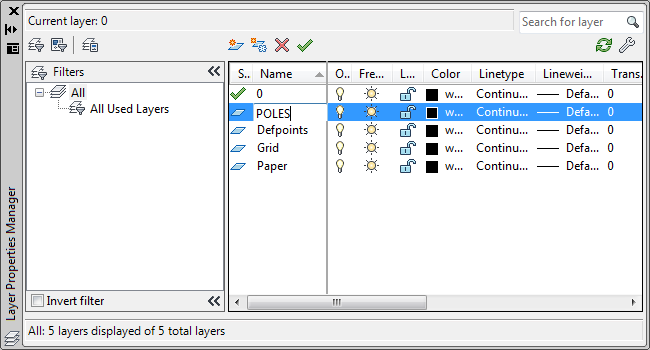
- Type LAYER at the command line to invoke the Layer Properties Manager:
- Click the new layer button (in red above).
- Type POLES for the layer name:
- Close the Layer Properties Manager.
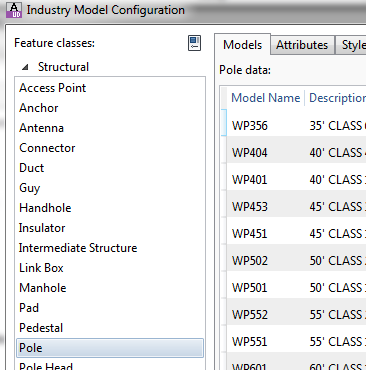
- In the Configuration tab in the ribbon click the Industry Model button:
- Choose the Pole Feature Class:
- Click on the Styles tab:
- Click on the Default 2D Plan Symbol, then click the edit button (in red below):
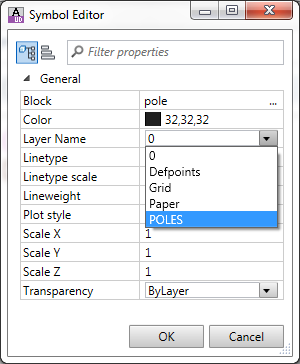
- In the Symbol Editor drop down the Layer Name pick list and choose the POLES layer:
- Click OK to close the Symbol Editor.
- Click Apply to save the changes in the Industry Model Configuration window.
- Click OK to close the Industry Model Configuration window.
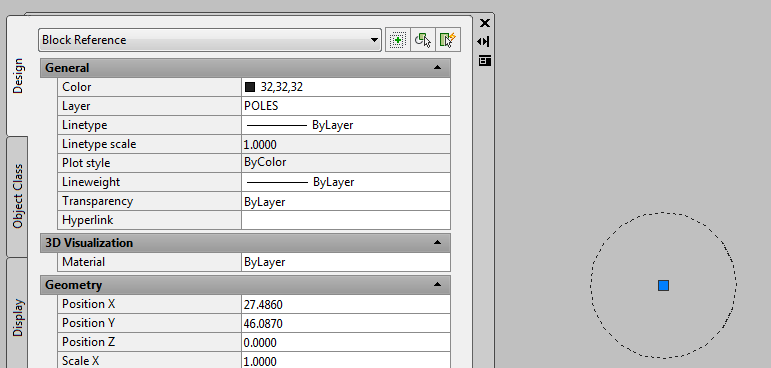
- Select an existing Pole or create and a new one and view its properties (select pole, right-click, choose Properties). You will see the layer is now POLES:
- Repeat this process for the Existing and Removal Pole Styles as well or any other AUD object type. You can create layers for each state and then can control AUD Object visibility with traditional AutoCAD layer tools.




Friday, March 22, 2013
Visit us at the APPA E&O Conference next week!
Spatial Business Systems will be in booth 519 at the APPA E&O Conference next week.
Stop by and see how we can improve you engineering, design and staking environment with our DWConnector solutions.
Here are the show details:
http://www.publicpower.org/EandO/index.cfm?ItemNumber=29261&navItemNumber=29236
See you there!
Jeremiah
Stop by and see how we can improve you engineering, design and staking environment with our DWConnector solutions.
Here are the show details:
http://www.publicpower.org/EandO/index.cfm?ItemNumber=29261&navItemNumber=29236
See you there!
Jeremiah
Monday, March 18, 2013
Video: Using GPS and Survey data in AutoCAD Utility Design
Here is a short video I made on how to use GPS and Survey data in AUD.
Using_GPS_and_Survey_Data_in_AutoCAD_Utility_Desig
Jeremiah
Using_GPS_and_Survey_Data_in_AutoCAD_Utility_Desig
Jeremiah
Thursday, March 14, 2013
Win a trip to Autodesk University 2013!
This is an awesome opportunity to show you or your companies skills in Autodesk products and win an awesome prize! Check out Dana's for a great overview:
http://bimontherocks.typepad.com/my_weblog/2013/03/get-your-projects-recognized-and-maybe-win-a-trip-to-autodesk-university-au2013.html
And then sign up here:
http://www.infrastructure-excellence.com/
Good luck!
Jeremiah
http://bimontherocks.typepad.com/my_weblog/2013/03/get-your-projects-recognized-and-maybe-win-a-trip-to-autodesk-university-au2013.html
And then sign up here:
http://www.infrastructure-excellence.com/
Good luck!
Jeremiah
Wednesday, March 6, 2013
Spatial Business Systems Announces SpatialBiz Plug-in for FME 2013
Here is the official press release for our FME SpatialBiz Plugin!
February 20, 2013
Annecy, France – Spatial Business Systems (SBS) has announced at the Safe Software Value-Added Reseller conference the availability of the SpatialBiz Plug-in for FME 2013. The new release is compatible with FME 2013 and has a number of new features and improvements including:
This release marks the use of a new naming convention that is consistent with the Safe Software FME product suite designations. The SpatialBiz Plug-in, also known as the Smallworld Plug-in for FME, is the foundation for supporting advanced data translation and interoperability solutions with the GE Smallworld GIS product. Use of the SpatialBiz Plug-in with the SBS OSpatial Plug-in provides synchronized data exchange with Oracle Spatial, thus enabling coexistence of Smallworld with spatial data warehouses based on Oracle technologies. The SpatialBiz Plug-in also works with Esri GIS technologies to support dynamic access to the Smallworld VMDS database from supported Esri products, thus allowing Esri users to perform business analytics and spatial analysis on GE Smallworld data.
Availability of the SpatialBiz Plug-in 2013 is February 20, 2013.
About Spatial Business Systems
SBS offers an unparalleled combination of talent and advanced spatial information tools to help companies leverage their CAD and GIS investments by expanding them with open database, service-oriented, technologies. Headquartered in Lakewood, Colorado, with offices in Melbourne, Australia the SBS team is a highly regarded group of professional consultants and software developers, with many decades of experience in the application of geospatial information technologies. For additional information about SBS visit http://www.spatialbiz.com/ |
Subscribe to:
Posts (Atom)